---
title: Durascreen KX - How to change screen orientation
description: Learn how to change the screen orientation on your ProofVision DuraScreen KX digital signage display. Follow our step-by-step guide to switch between landscape and portrait mode.
---
[Skip to content](http://support.proofvision.co.uk/knowledge-base-proofvision/durascreen-kx-how-to-change-screen-orientation-android#main-content)
[](https://support.proofvision.co.uk/?hsLang=en)
Open main navigation
Close main navigation
- [Submit a Ticket](https://g6o7s.share-eu1.hsforms.com/2aV6aePXnR62VNqtfkXMfTg)
[Submit a Ticket](https://g6o7s.share-eu1.hsforms.com/2aV6aePXnR62VNqtfkXMfTg)
How can we help you?
- There are no suggestions because the search field is empty.
1. [ProofVision FAQs and Support](http://support.proofvision.co.uk/knowledge-base-proofvision?hsLang=en)
2. [Digital Signage](http://support.proofvision.co.uk/knowledge-base-proofvision/digital-signage?hsLang=en)
# Durascreen KX - How to change screen orientation
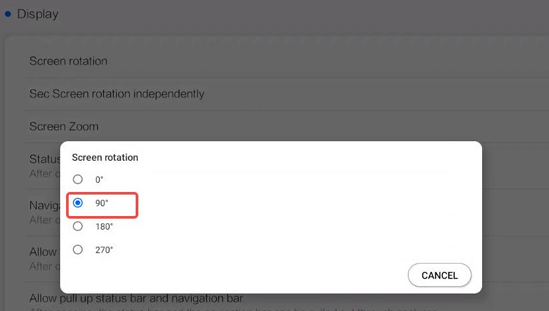
The Durascreen KX can be mounted in either landscape or portrait and the screen can be rotated in the settings to match.
1. Using the remote control, navigate to **OS Tools** from the home screen.
2. On the left sidebar, select **Display Manage**
3. Scroll down and select **Screen Rotation**
****
If you need any further support, please email technical@proofvision.co.uk or submit a support ticket [here](https://g6o7s.share-eu1.hsforms.com/2aV6aePXnR62VNqtfkXMfTg).
[](https://proofvision.co.uk/)
Unit 1, Avad House, Belvue Road, Northolt, London UB5 5HY
[+44 (0)203 411 1693](tel:02034111693) [sales@proofvision.co.uk](mailto:sales@proofvision.co.uk?utm_source=organic_website&utm_medium=article&utm_campaign=tbcharge_FAQ_Blog&utm_term=120241011204940181&utm_content=120241011319740181)
Copyright © 2026,